Playbooks
A policy decides what happens to one request. A playbook decides what happens about the pattern those requests make: block the caller, pause the route, page somebody, file the incidence. Playbooks run after the response has already gone out, so they never add latency to a request.
Policies, Playbooks and Alerts
| Decides | When | |
|---|---|---|
| Policy | What happens to one request: pass, mask or block | In flight, before the model or tool |
| Playbook | What to do about a pattern: contain, release, notify, open a ticket, triage | After the request, on every matching incidence |
| Alert | Who hears about something, and when | On real traffic, with pacing, quiet hours and reports |
Start From a Template
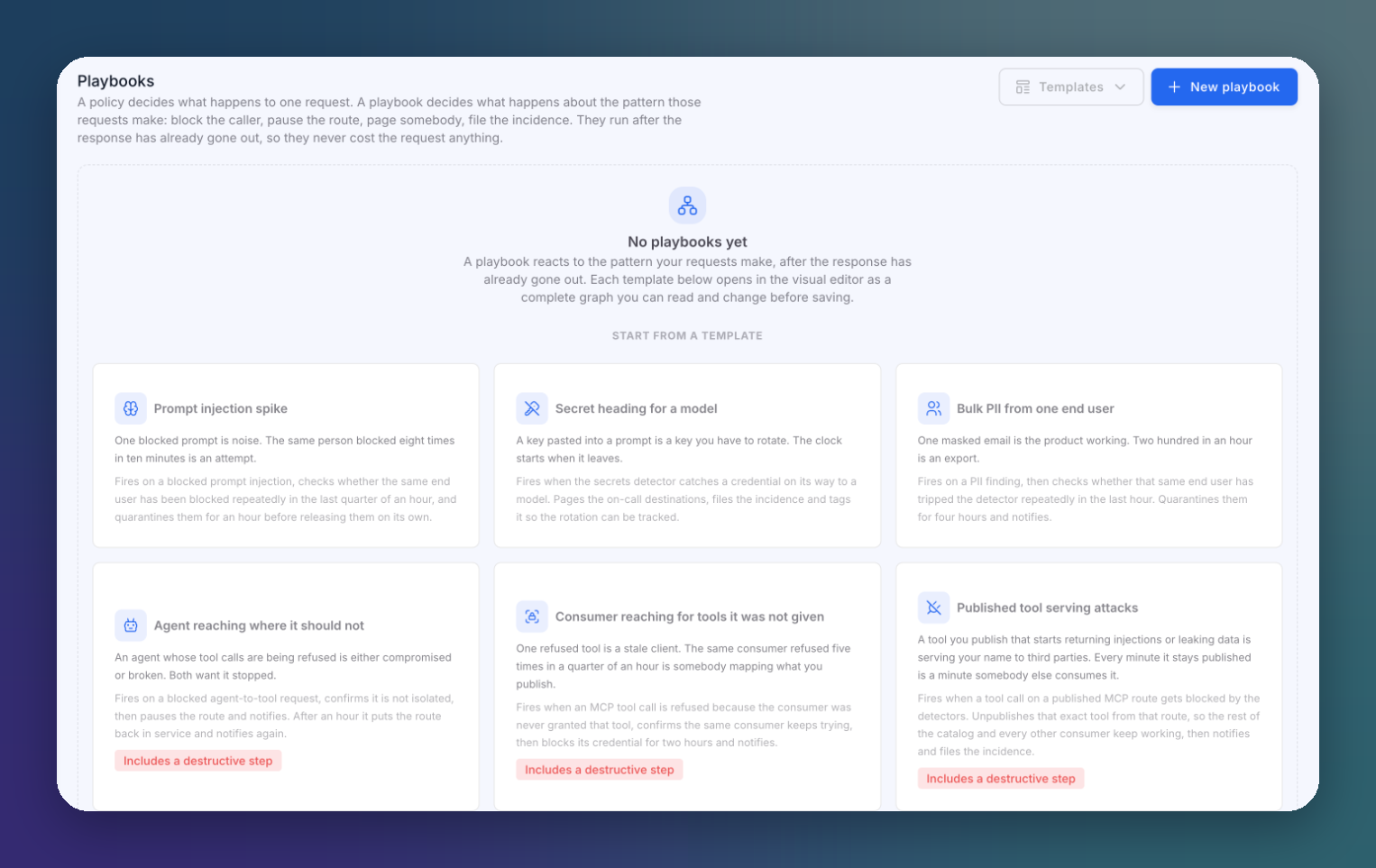
Open AI runtime → Playbooks. Each template opens in the visual editor as a complete graph you can read and change before saving.
 Click to expand
| Template | What it does |
|---|---|
| Prompt injection spike | On a blocked prompt injection, checks whether the same end user was blocked repeatedly in the last 15 minutes, and quarantines them for an hour before releasing them |
| Secret heading for a model | When the secrets detector catches a credential on its way to a model, pages the on-call destinations, files the incidence and tags it so the rotation can be tracked |
| Bulk PII from one end user | On a PII finding, checks whether the same end user tripped the detector repeatedly in the last hour, quarantines them for four hours and notifies |
| Agent reaching where it should not | On a blocked agent-to-tool request that is not isolated, pauses the route and notifies. An hour later it puts the route back in service |
| Consumer reaching for tools it was not given | When the same consumer keeps calling MCP tools it was never granted, blocks its credential for two hours and notifies |
| Published tool serving attacks | When a call to a published MCP tool is blocked, unpublishes that tool from that route only, notifies and files the incidence |
| Spend running away on a model | Watches the last hour of spend on a model, notifies, waits up to an hour for it to settle, and blocks the model if it does not |
Templates marked Includes a destructive step block, pause or unpublish something. Review those steps before you enable the playbook.
You can also click New playbook to start from scratch.
The Visual Editor
 Click to expand
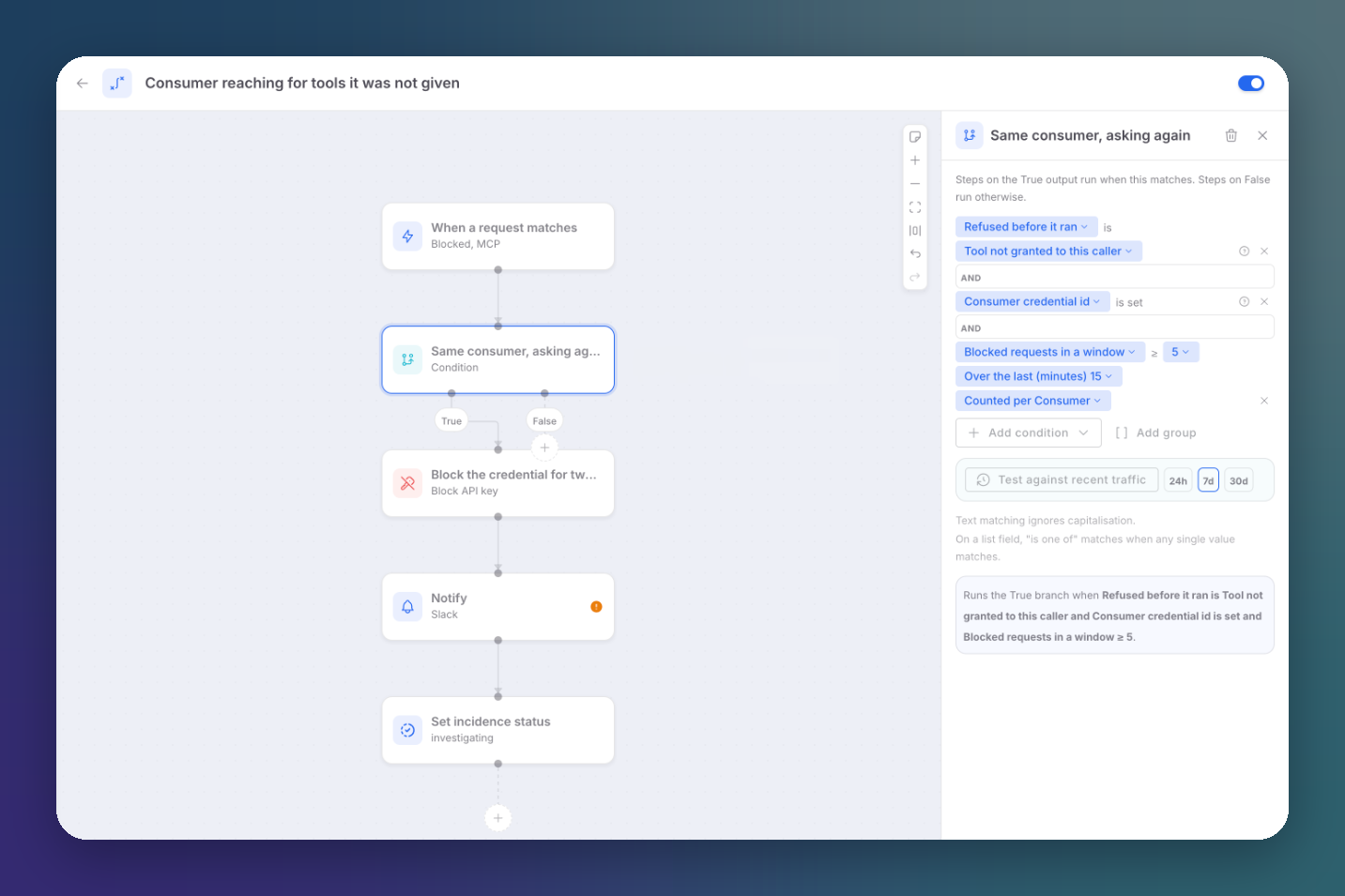
A playbook is a graph of steps. Click a step to configure it in the side panel; click the + under a step, or on a connector, to add one.
Trigger
Every playbook starts with When a request matches: the incidences it runs on, for example blocked MCP requests.
Conditions
A Condition branches the playbook: steps on the True output run when it matches, steps on False otherwise. Conditions combine fields with AND, and can be grouped. Fields cover:
| Group | Examples |
|---|---|
| Verdict | Verdict, whether it was blocked, input or output, HTTP status, strongest severity |
| Detection | Primary detector, every detector that fired, categories, entities, secret kinds, scores |
| Taxonomy | OWASP LLM categories, MITRE ATLAS techniques, CWE identifiers |
| Where | Route, route type, policy, provider, model |
| Who | End user, caller IP and country, gateway key prefix, MCP consumer |
| MCP | Operation, the tool actually called, the published tool name, own or upstream, upstream server, why the call was refused |
| Usage | Tokens, estimated cost, latency |
Counters such as Blocked requests in a window, counted per consumer, end user or other key over the last N minutes, turn single events into patterns.
Test against recent traffic runs the condition over the last 24 hours, 7 days or 30 days, so you see how often it would have matched before you enable it.
Timing
| Step | Effect |
|---|---|
| Wait | Pauses the playbook, then carries on |
| Wait until | Pauses until conditions are met, or gives up after a while |
Waits are stored and resumed by the gateway, so a playbook can release a quarantine hours later on its own.
Actions
| Group | Steps |
|---|---|
| Contain | Block IP, Block end user, Block country, Block API key, Block model, Pause route, Unpublish MCP tool from route, Disable MCP tool everywhere, Revoke consumer access to route, Revoke consumer credential |
| Release | Unblock IP, Unblock end user, Resume route, Enable MCP tool |
| Tell somebody | Notify, Forward to SIEM |
| Integrations | Create task, Escalate on call, Trigger automation, Archive evidence |
| Triage | Set incidence status, Tag incidence |
Blocks created by a playbook appear in the Firewall with the playbook as their source. Notify, Forward to SIEM and the Integrations steps need the corresponding tool connected in your organization's Integrations; until then the step is marked as needing attention.
Enable and App runtime
Use the switch on each playbook to enable or disable it. Each playbook keeps a history of its runs, with the incidence that started each one.