Integrations
An integration is a connection to a model provider or managed agent. It holds the endpoint, the credentials and the models your routes can forward traffic to, so your applications never need the provider key themselves.
Integrations List
Open AI runtime → Integrations to see every connected provider. Integrations are shared across all projects in the organization.
| Column | Description |
|---|---|
| Status | Whether the integration is active |
| Name | The friendly name you gave it, shown when picking a target in a route |
| Provider | The provider type (openai, anthropic, azure, vertex, bedrock, bedrock-agentcore...) |
| Default model / agent | The default target. For a managed agent it is the agent reference; for AgentCore, the runtime name |
| Models | How many models the integration exposes |
Click a row to open the integration and edit it.
Add an Integration
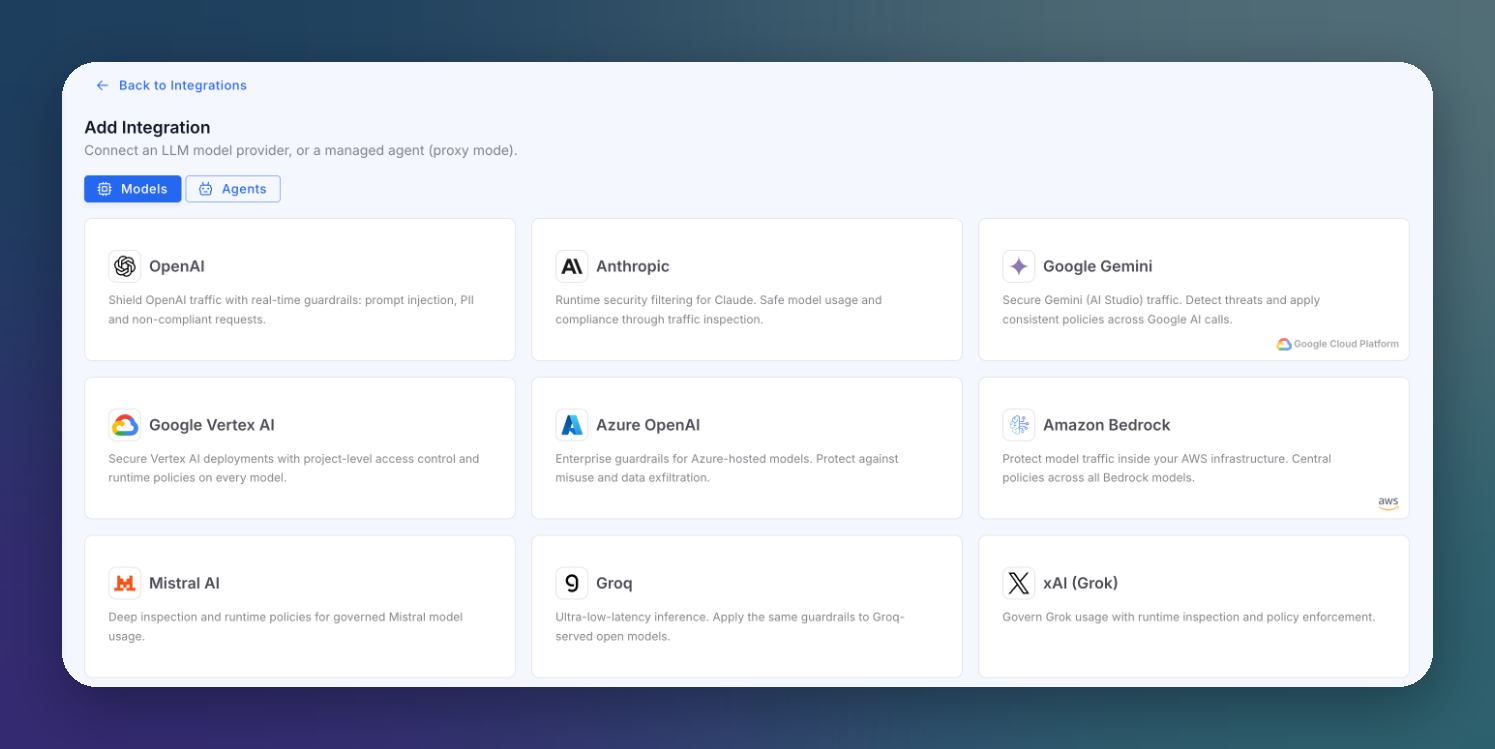
Click Add Integration. The wizard has two steps: pick the provider, then configure it.
Step 1: Pick the Provider
 Click to expand
The Models tab lists the model providers:
| Provider | Notes |
|---|---|
| OpenAI | Chat Completions and the OpenAI SDKs |
| Anthropic | Claude models, including the native Messages API |
| Google Gemini | Gemini through Google AI Studio |
| Google Vertex AI | Models deployed on Vertex AI |
| Azure OpenAI | Models deployed on your Azure OpenAI resource |
| Amazon Bedrock | All Bedrock models, through the Converse and InvokeModel APIs |
| Mistral AI, Groq, xAI (Grok), DeepSeek, Cohere, Together AI, OpenRouter, Perplexity, Fireworks AI, Cerebras, NVIDIA NIM | Hosted model providers |
| Custom Backend | Your own LLM service, a self-hosted OpenAI-compatible endpoint or an Ollama host |
The Agents tab lists managed agent platforms. The gateway proxies the agent invocation and guards its input and final output:
| Agent platform | What it connects |
|---|---|
| Amazon Bedrock AgentCore | An AgentCore Runtime, identified by its agent runtime ARN. ByteHide guards agent conversations, tool calls and MCP runtimes. |
| Amazon Bedrock Agent | A Bedrock Agent (classic), identified by agent ID and alias ID. Marked Legacy because AWS closed it to new customers; existing agents keep working. |
| Azure AI Foundry Agent | A managed Azure AI Foundry agent (Responses API) |
| Vertex AI Agent Engine | A managed Google Vertex AI Agent Engine (reasoning engine) |
Step 2: Configure It
 Click to expand
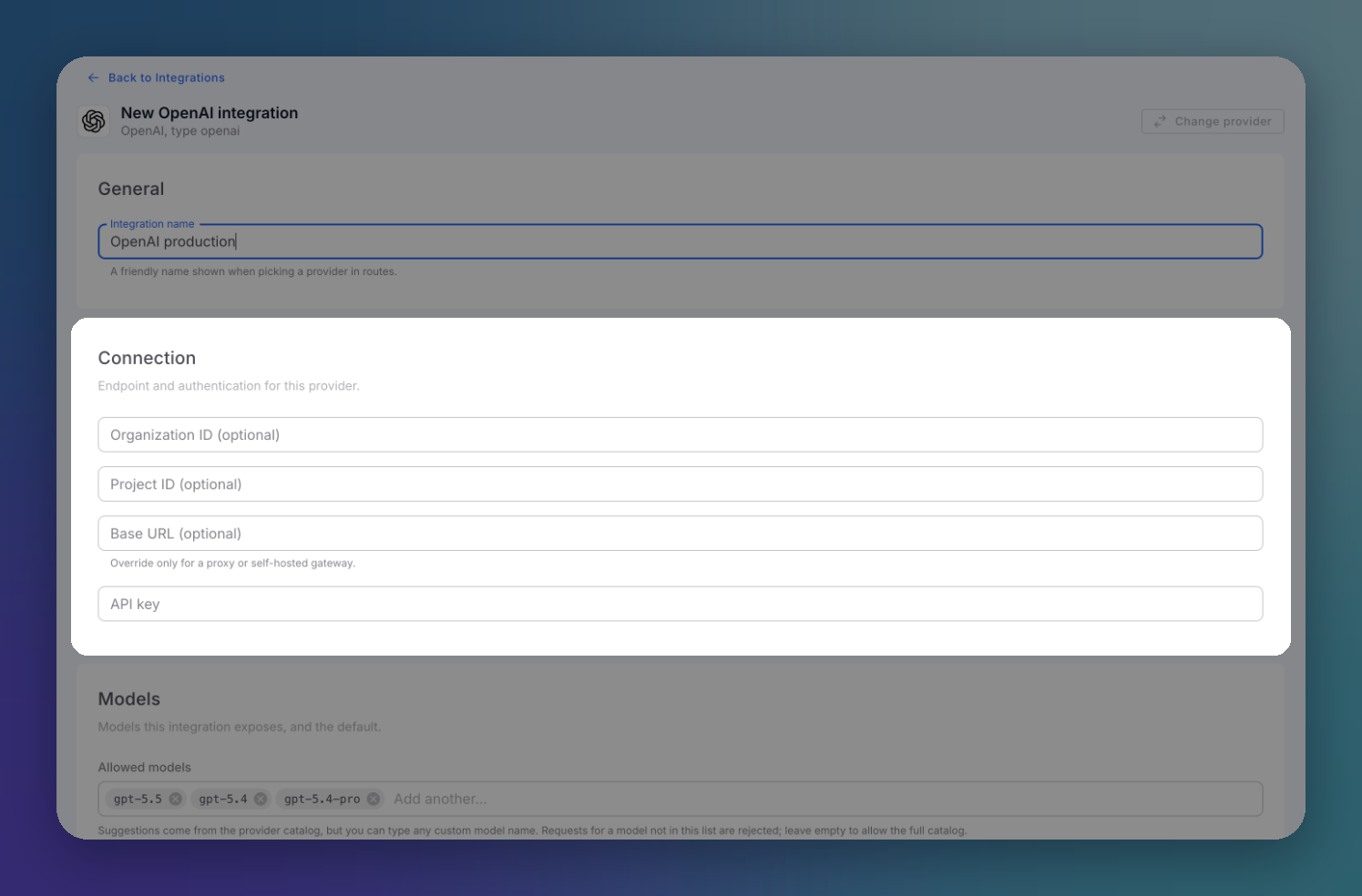
The form adapts to the provider. For OpenAI it has three sections:
| Section | Fields |
|---|---|
| General | Integration name, shown when you pick a target in a route |
| Connection | Optional Organization ID, Project ID and Base URL (override only for a proxy or a self-hosted gateway), and the API key |
| Models | Allowed models, the Default model and Enable streaming |
Allowed models restricts what clients can request through this integration. Suggestions come from the provider catalog, but you can type any model name. Requests for a model that is not in the list are rejected; leave the list empty to allow the full catalog.
Enable streaming lets clients receive the answer token by token. Turn it off to force buffered responses: the gateway collects the full reply before returning it.
Click Create integration to save.
Credentials are write-only
Provider keys are encrypted at rest and never shown again once saved. When you edit an integration, an empty secret field means unchanged, not missing.
Provider-Specific Notes
Azure OpenAI
The model a client requests is the deployment name on your Azure resource. The integration holds the resource endpoint and API version, and the gateway sends the key the way Azure expects it.
Amazon Bedrock
A Bedrock integration can authenticate with a Bedrock API key or with an IAM access key pair. Clients keep sending the Bedrock model ID (or inference profile ID) they already use.
Custom Backend
Use Custom Backend for anything not in the list: an OpenAI-compatible server, an Ollama host or an Anthropic-compatible endpoint. Point it at the base URL you would set as the SDK base_url. The same detectors apply as for any hosted provider.