Incidences
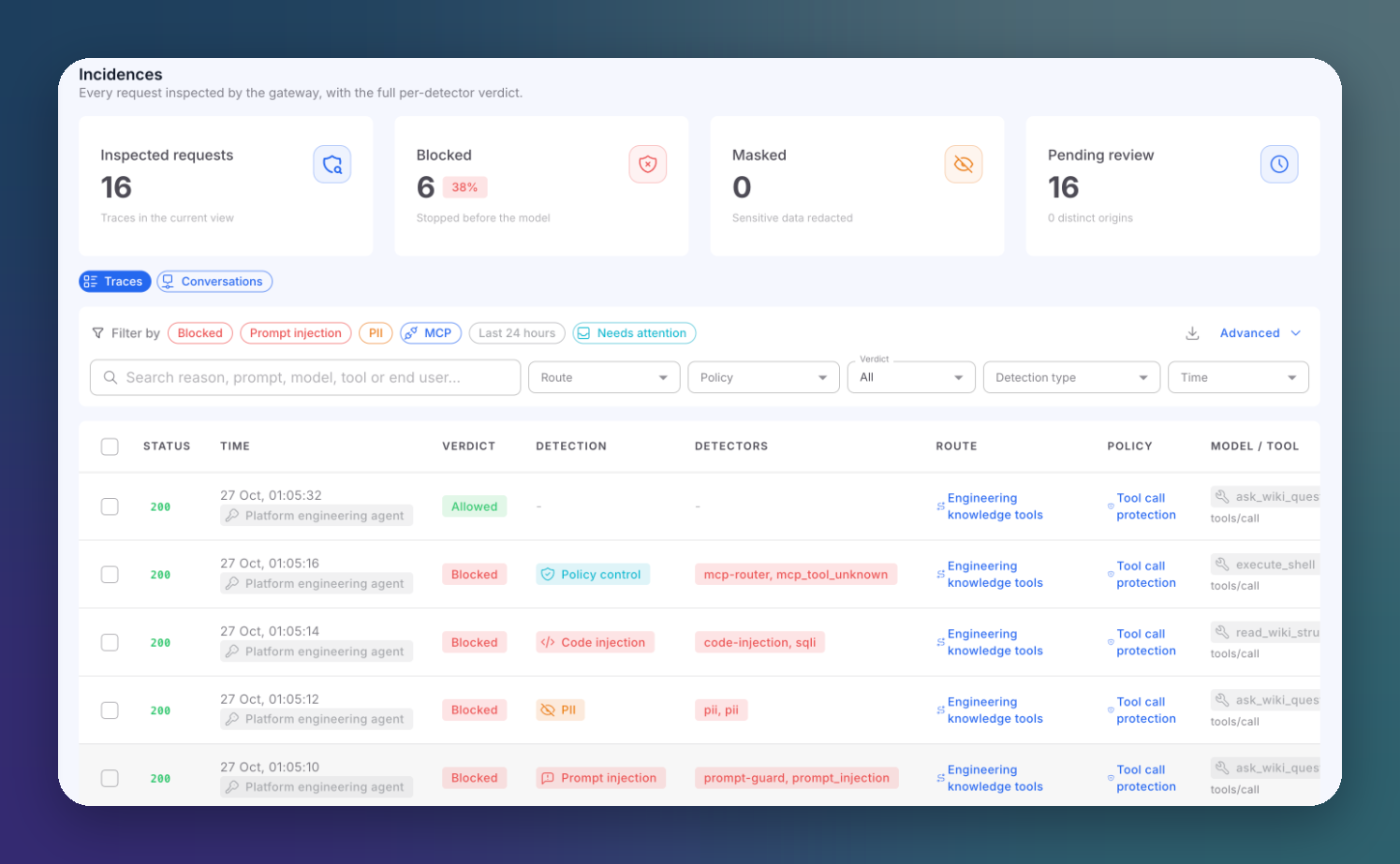
Incidences lists every request AI Runtime inspected, one row per check, with the full per-detector verdict. It is where you investigate an attack, confirm a policy works, and follow up on what needs attention.
Incidences Screen
Open AI runtime → Incidences.
 Click to expand
Summary Cards
| Card | Description |
|---|---|
| Inspected requests | Traces in the current view |
| Blocked | Requests stopped before reaching the model or tool, with their percentage |
| Masked | Requests where sensitive data was redacted |
| Pending review | Incidences not yet closed by triage, and how many distinct origins they come from |
The cards follow the active filters: they describe the view you are looking at, not all history.
Incidences Table
| Column | Description |
|---|---|
| Status | The HTTP status the client actually received |
| Time | When it happened, plus the consumer, the triage status and a linked ticket when there is one |
| Verdict | Allowed, Blocked, Masked or Flagged |
| Detection | The kind of detection, such as Prompt injection, PII, Code injection or Policy control |
| Detectors | Which detectors fired |
| Route | The route, linked to its detail |
| Policy | The policy, linked to its detail |
| Model / Tool | The model for LLM traffic. For MCP traffic, the real tool that ran and the operation (tools/call, tools/list...) |
Click a row to open the incidence detail. The table shows 50 rows per page.
Traces and Conversations
The toggle above the filters switches between two views:
| View | Shows |
|---|---|
| Traces | One row per inspected request |
| Conversations | Requests grouped by conversation, so a multi-turn attack reads as one story. Columns: Conversation, End user, Turns, Blocked, Outcome, Routes, Duration and Last activity |
Conversations are grouped by the x-conversation-id header your application sends. Without it, the gateway derives a stable ID from the opening message, the route and the end user. See Optional Headers.
Filters
Preset Filters
One click applies a common filter:
| Preset | Shows |
|---|---|
| Blocked | Blocked requests only |
| Prompt injection | Prompt injection and jailbreak detections |
| PII | PII detections |
| MCP | All MCP traffic |
| Last 24 hours | The last day |
| Needs attention | Everything not yet closed by triage (hides Resolved, False positive and Ignored) |
Main Filters
Free-text search (reason, prompt snippet, model, route, end user, MCP tool, operation and consumer), Route, Policy, Verdict, Detection type and Time.
Advanced Filters
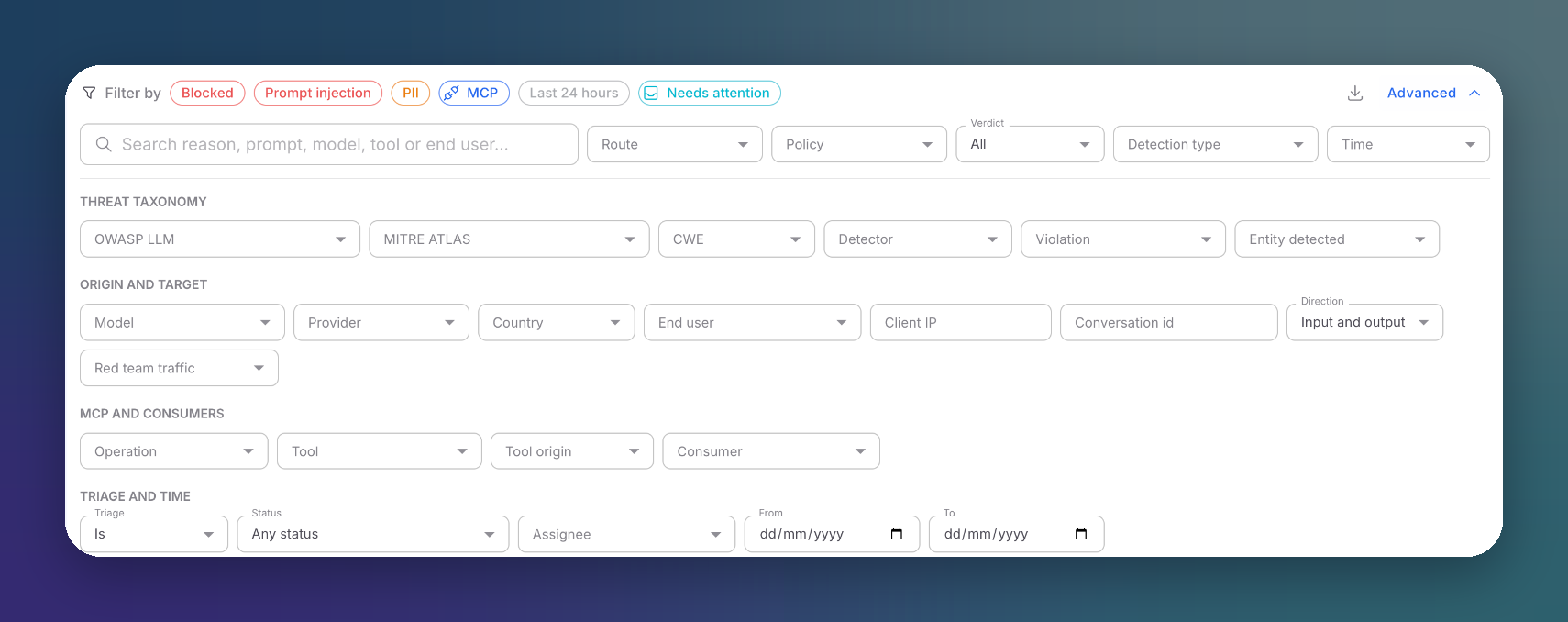
Click Advanced to open every filter, grouped by what it describes:
 Click to expand
| Group | Filters |
|---|---|
| Threat taxonomy | OWASP LLM (Top 10 for LLM Applications), MITRE ATLAS technique, CWE, Detector, Violation, Entity detected |
| Origin and target | Model, Provider, Country, End user, Client IP, Conversation ID, Direction (input, output or both), Red team traffic |
| MCP and consumers | Operation, Tool, Tool origin (own or imported), Consumer |
| Triage and time | Triage status (is / is not), Assignee, From and To dates |
Red team traffic is excluded by default, so rehearsed attacks never inflate your real numbers.
Large result sets
Some filters (model, provider, IP, taxonomy, entity and date range, among others) are refined over the 1,000 most recent matching incidences. When the window is capped, the screen tells you, and the totals describe that window.
Shareable Views
Every filter is stored in the URL, so a filtered view is a link you can share. A single incidence has its own link: the drawer adds ?trace= with the check ID, and the link button (Copy link to this incidence) copies it.
Bulk Actions and Export
Select rows with their checkboxes to act on several incidences at once:
- Set a triage status for all of them.
- Export the selection to CSV.
- Copy the trace IDs.
The download button next to Advanced exports the current view, with every active filter, up to the 2,000 most recent incidences.
Incidences per Route
Each route has its own Incidences tab, pre-filtered to its traffic. See Route Detail.
Next Steps
Incidence Detail
Read the per-detector verdict of one request
Triage & Feedback
Assign, resolve and report detection mistakes
Attackers
See who is attacking, grouped by origin