Inventory
The inventory shows what your developers' coding agents actually use: the MCP servers they installed, the skills they loaded and the models they call. It is also where you tune the built-in dangerous tool rules and block what your organization does not allow.
The agent reports each device's inventory on startup and every 30 minutes.
MCP Servers
Agentic runtime → MCPs lists every MCP server your fleet has installed or invoked. The agent reads the MCP configurations of Claude Code, Claude Desktop and Cursor on each machine.
| Tab | Shows |
|---|---|
| Inventory | One row per server, with the devices that have it. Servers that fired incidences are flagged. Click a row for its devices, findings and policy bans |
| Catalog | The known MCP servers, to approve or block |
| Blocked | Servers banned by policy |
| Drift | Servers whose definition changed since they were first seen |
| Config | Detection settings for malicious MCP servers |
Skills
Agentic runtime → Skills covers Claude Code skills: SKILL.md files that extend Claude Code with custom instructions and, optionally, tool grants. Skills live in ~/.claude/skills/ (personal), in .claude/skills/ inside a repository (project), or come from installed plugins.
| Tab | Shows |
|---|---|
| Discovered on devices | Skills the agent found on developer machines. Read-only inventory |
| Distributed by org | Skills your organization pushes to selected developers. They land in their ~/.claude/skills/ |
| Blocked | Skills banned by name. When Claude Code starts, the agent refuses to load any skill on this list, even if it is already on disk |
| Config | What counts as a malicious skill (dangerous tools, prompt injection, known-bad authors) and which values you trust as exceptions |
Tools
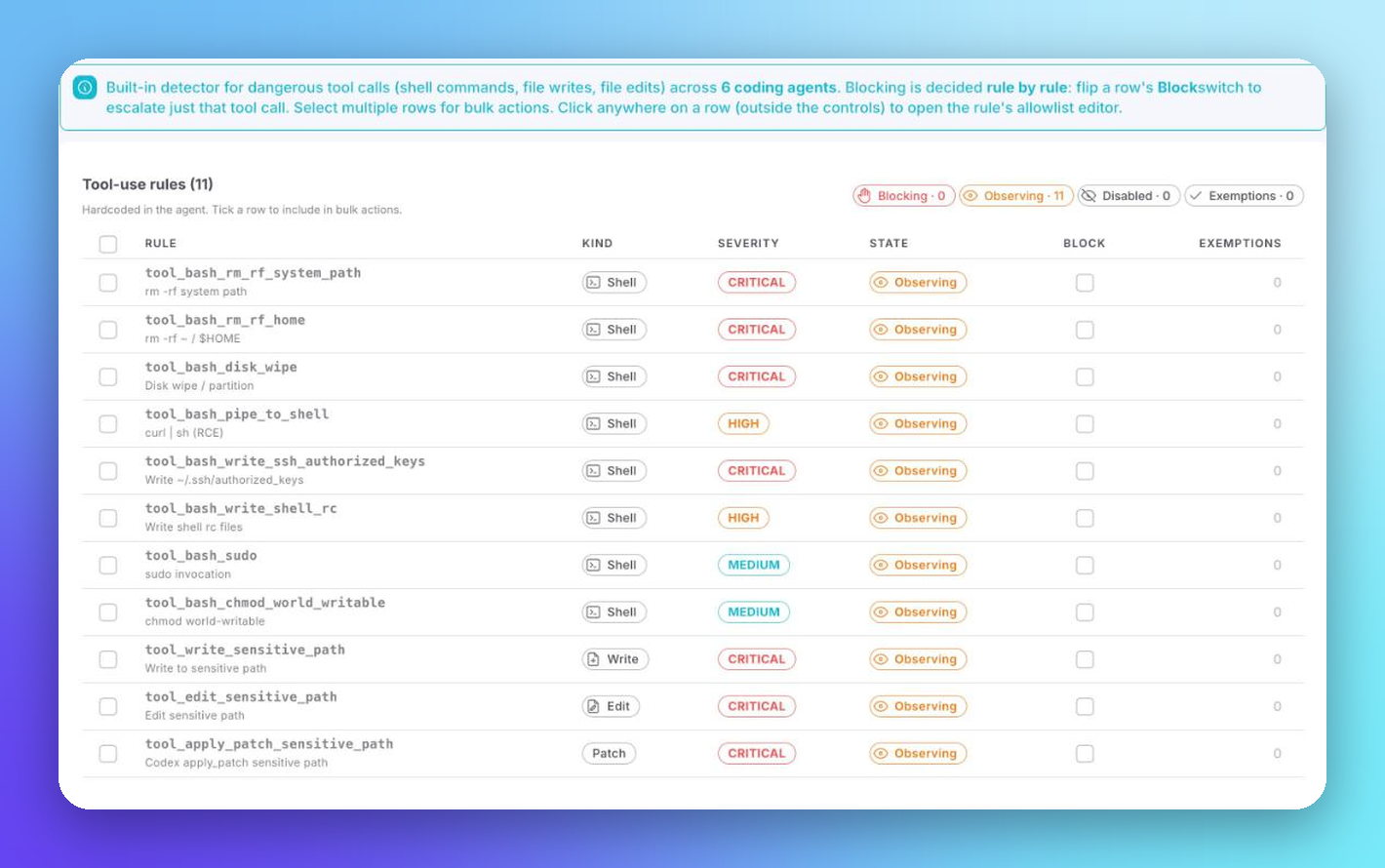
Agentic runtime → Tools holds the built-in rules for dangerous tool calls (shell commands, file writes and edits) across six coding agents.
 Click to expand
| Column | Description |
|---|---|
| Rule | Rule ID and what it detects, such as rm -rf on a system path or `curl |
| Kind | Shell, Write, Edit or Patch |
| Severity | Critical, High or Medium |
| State | Blocking, Observing or Disabled |
| Block | Escalates that one rule from observing to blocking |
| Exemptions | Allowlisted values for the rule |
Blocking is decided rule by rule. Select several rows for bulk actions, or click a row to open its allowlist editor.
Models
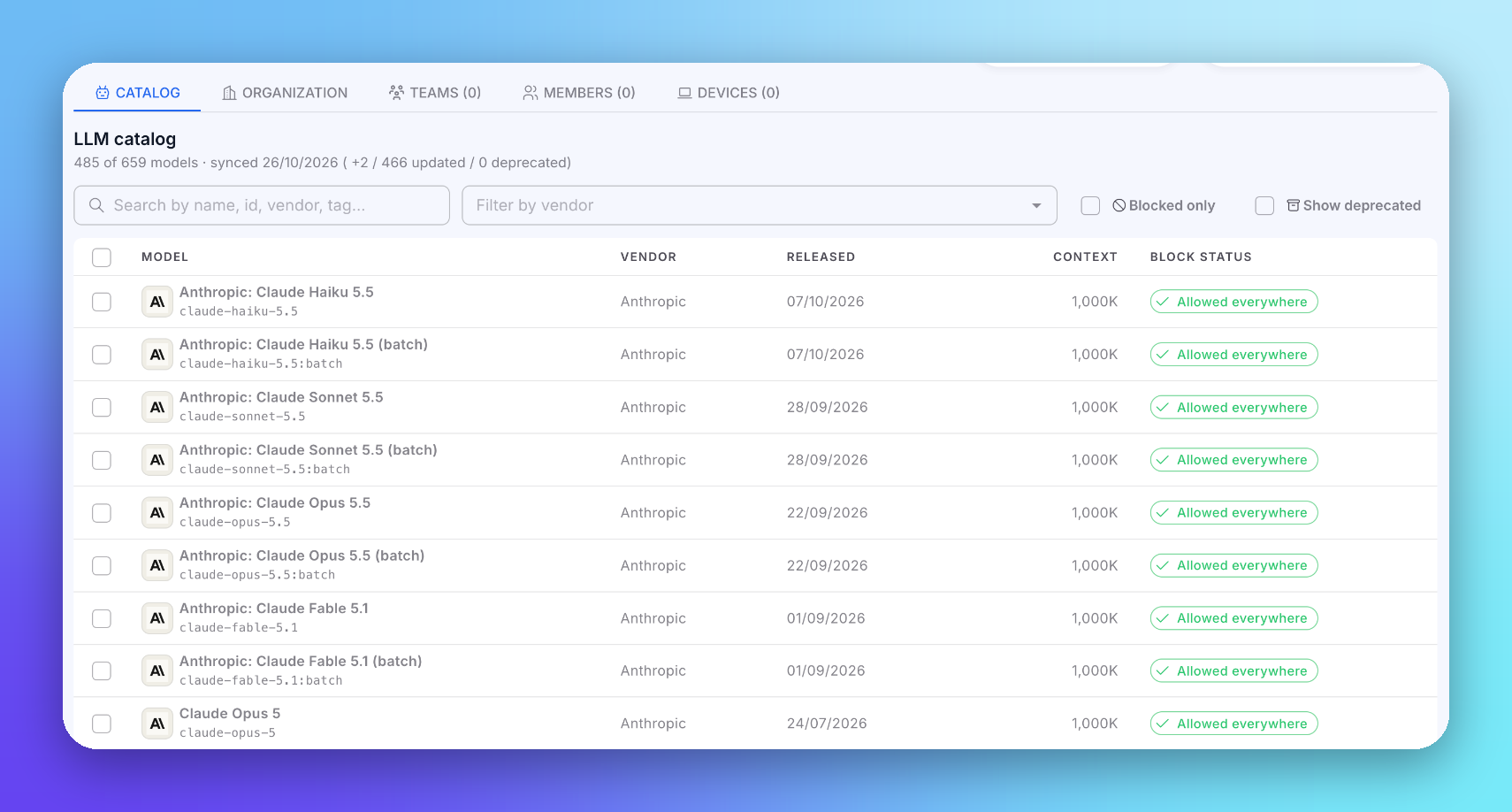
Agentic runtime → Models is a catalog of LLMs, synced from the providers, with each model's vendor, release date, context window and block status.
 Click to expand
Filter by name, ID, vendor or tag, show blocked models only, or include deprecated ones. Block models for the whole Organization, or per Team, Member or Device from the tabs above the catalog. The Block status column shows where each model is allowed.
Agents
An inventory of the coding agents on each device is coming soon.
Next Steps
Policies
Turn inventory into rules
Devices & Members
See what each device has