Detecting and Responding to Runtime Attacks
Your application is live. Static analysis ran during development, obfuscation protected the build. But once the application is running, it faces a completely different category of threats. This guide explains how runtime protection actually works under the hood, why the tools most teams rely on have architectural blind spots they cannot fix, and what effective runtime defense looks like for both cloud APIs and mobile applications.
Two Different Runtime Problems
Runtime security covers two fundamentally different scenarios. The threats, the attack surface, and the protection mechanisms are completely different. Understanding this split is the starting point for any runtime security strategy.
On cloud/server, the attacker sends requests. They are trying to exploit vulnerabilities in your code through the network. Your application processes those requests, and the attack happens inside the execution path.
On mobile, the attacker has your binary on their device. They can decompile it, attach a debugger, hook functions, and modify the binary itself. There is no server sitting in front of it.
This guide covers both, starting with cloud because it is where most teams already have (and over-trust) their existing defenses.
Part 1: Cloud and API Runtime Security
How a Web Application Firewall Actually Works
Before understanding why a WAF has limitations, it helps to understand what it actually does at a technical level. Most teams deploy a WAF and trust it without fully understanding the architecture. That understanding is what separates a reasonable security posture from a dangerous one.
A WAF is a reverse proxy. It sits between the internet and your application server. Every HTTP request passes through it before reaching your application.
When a request arrives, the WAF performs these steps:
1. Request parsing. The WAF extracts the components of the HTTP request: URL path, query parameters, headers, cookies, and request body. It decodes URL encoding, Base64, and common encoding schemes.
2. Signature matching. Each component is compared against a library of regular expressions that represent known attack patterns. For SQL injection, these are patterns like ' OR 1=1, UNION SELECT, ; DROP TABLE, WAITFOR DELAY, and hundreds of variations. For XSS, patterns like <script>, javascript:, onerror=, and similar.
3. Anomaly scoring. Some WAFs use a scoring model where each suspicious signal adds points. If the total score exceeds a threshold, the request is blocked. This is how ModSecurity's Core Rule Set works: a request might trigger three low-confidence rules that individually would not block, but together cross the threshold.
4. Decision. The WAF either forwards the request to the application, blocks it with a 403 response, or flags it for logging.
That is the entire process. The WAF never sees what happens after the request reaches the application. It does not know which function processes the input. It does not know whether the input reaches a database query, a file system call, or a shell command. It does not know whether the application has a sanitization layer that neutralizes the payload, or whether the payload bypasses all validation.
Why This Architecture Has Inherent Blind Spots
The limitations of a WAF are not bugs. They are consequences of the architecture. A reverse proxy that inspects HTTP traffic cannot know things that only the application knows.
Blind spot 1: No data flow visibility
The WAF sees a request parameter: `id=1'. The value looks suspicious because of the single quote. But:
- Does this parameter reach a SQL query? Or does it go to a logging function that treats it as a string?
- Does the application use parameterized queries? If yes, the single quote is harmless.
- Does the application apply input validation before the value reaches the query builder? If yes, the payload never reaches the dangerous function.
The WAF cannot answer any of these questions. It sees the input, guesses that it looks dangerous based on pattern matching, and makes a binary decision. This is why WAF false positive rates are high: the WAF blocks inputs that look dangerous but are actually harmless in the application's context.
Blind spot 2: Encoding and serialization
Your application might use custom serialization for API payloads. Protocol Buffers, MessagePack, Thrift, or even custom JSON structures with nested encoding. The WAF parses standard HTTP encodings, but it cannot deserialize your application's custom format.
An attacker who knows your serialization format can embed a SQL injection payload inside a protobuf field. The WAF sees binary data that does not match any signature. The application deserializes it, extracts the string, and passes it to a query builder. The attack succeeds.
This is not theoretical. Any API that uses non-standard serialization has this blind spot.
Blind spot 3: Business logic attacks
A WAF blocks known technical attack patterns. It cannot understand business logic.
Consider a banking API where a transfer endpoint accepts a source account, destination account, and amount. A legitimate request looks like: POST /api/transfer { from: "ACC001", to: "ACC002", amount: 100 }. An attack might look like: POST /api/transfer { from: "ACC002", to: "ACC001", amount: -100 }. Or the attacker might simply call the endpoint 10,000 times with small amounts.
The WAF sees valid HTTP requests with valid JSON payloads. There is no SQL injection, no XSS, no known attack pattern. The attack is pure business logic manipulation, and the WAF has no way to detect it because it does not understand what the application is supposed to do.
Blind spot 4: Context-dependent attacks
The same input can be safe or dangerous depending on context. A string like <b>hello</b> is safe when it is stored and displayed as plain text. It is dangerous when it is injected into an HTML template and rendered as markup (stored XSS).
The WAF does not know which template engine your application uses, whether the output is escaped, or whether the value is rendered in a context where HTML is interpreted. It sees the angle brackets, applies a generic rule, and either blocks (false positive if the application escapes output) or allows (false negative if the application does not).
Blind spot 5: Zero-day payloads
WAF signatures are based on known attack patterns. A researcher discovers a new SQL injection technique that uses uncommon syntax. Until the WAF vendor updates the signature library, the WAF does not detect it. The window between discovery and signature update is the vulnerability window, and it can be days or weeks.
What This Means in Practice
The sum of these blind spots creates two dangerous outcomes:
False positives erode trust. The WAF blocks legitimate requests because the payload triggered a signature match that is not actually dangerous in your application's context. The operations team adds exceptions. Over time, the ruleset becomes permissive. After enough exceptions, the WAF is essentially a passthrough for anything that is not a textbook SQL injection from 2012.
False negatives create false confidence. The WAF dashboard shows "99.7% of attacks blocked." But the 0.3% that got through were the sophisticated attacks that actually matter. And the attacks that used custom encoding, business logic manipulation, or zero-day payloads were never counted because the WAF did not recognize them as attacks.
The team believes they are protected. The WAF metrics reinforce that belief. The actual security posture is significantly weaker than the dashboard suggests.
The Alternative: Protecting From Inside the Application
The fundamental problem with a WAF is that it operates from outside the application. The solution is to move the protection inside.
An in-app runtime protection layer (commonly called RASP, Runtime Application Self-Protection) runs as part of the application process. It does not inspect HTTP traffic from the network. It instruments the application's execution and traces data flow from the moment user input enters the application to the point where it reaches a database query, file system operation, shell command, or output template.
The architectural difference is fundamental:
Because the RASP runs inside the application, it has access to everything the application knows:
Data flow tracing. The RASP follows user input through function calls, transformations, and processing layers. It knows that the value in request.query.id was passed to UserService.getById(), which passed it to UserRepository.findOne(), which constructed a SQL query using string concatenation on line 47. It confirms that the input reached a dangerous sink without being sanitized.
Application context. The RASP knows the user's authentication state, their role, the session history, and the request context. It can distinguish between an admin running a complex query (legitimate) and an anonymous user sending the same query (suspicious).
Post-decoding visibility. The RASP sees data after the application has decoded, deserialized, and processed it. Custom serialization, protocol buffers, encrypted payloads: by the time the data reaches the vulnerable function, the application has already decoded it, and the RASP sees the decoded value.
Zero-day detection. The RASP does not need signatures for known attack patterns. It traces behavior. If user input reaches a SQL query without parameterization, that is a vulnerability being exploited, regardless of whether the specific payload is in any signature database. The detection is based on what the input does, not what it looks like.
This is the core difference: a WAF asks "does this input look dangerous?" A RASP asks "does this input do something dangerous?"
What In-App Runtime Protection Should Look Like
For a cloud application, effective in-app protection needs to cover:
Injection detection with context. SQL injection, NoSQL injection, XSS, command injection, path traversal, LDAP injection, SSRF, XXE. Each detected by tracing the actual data flow, not by pattern matching. When a detection occurs, the report includes the exact payload, the function that processed it, the query or command that was constructed, and the full stack trace.
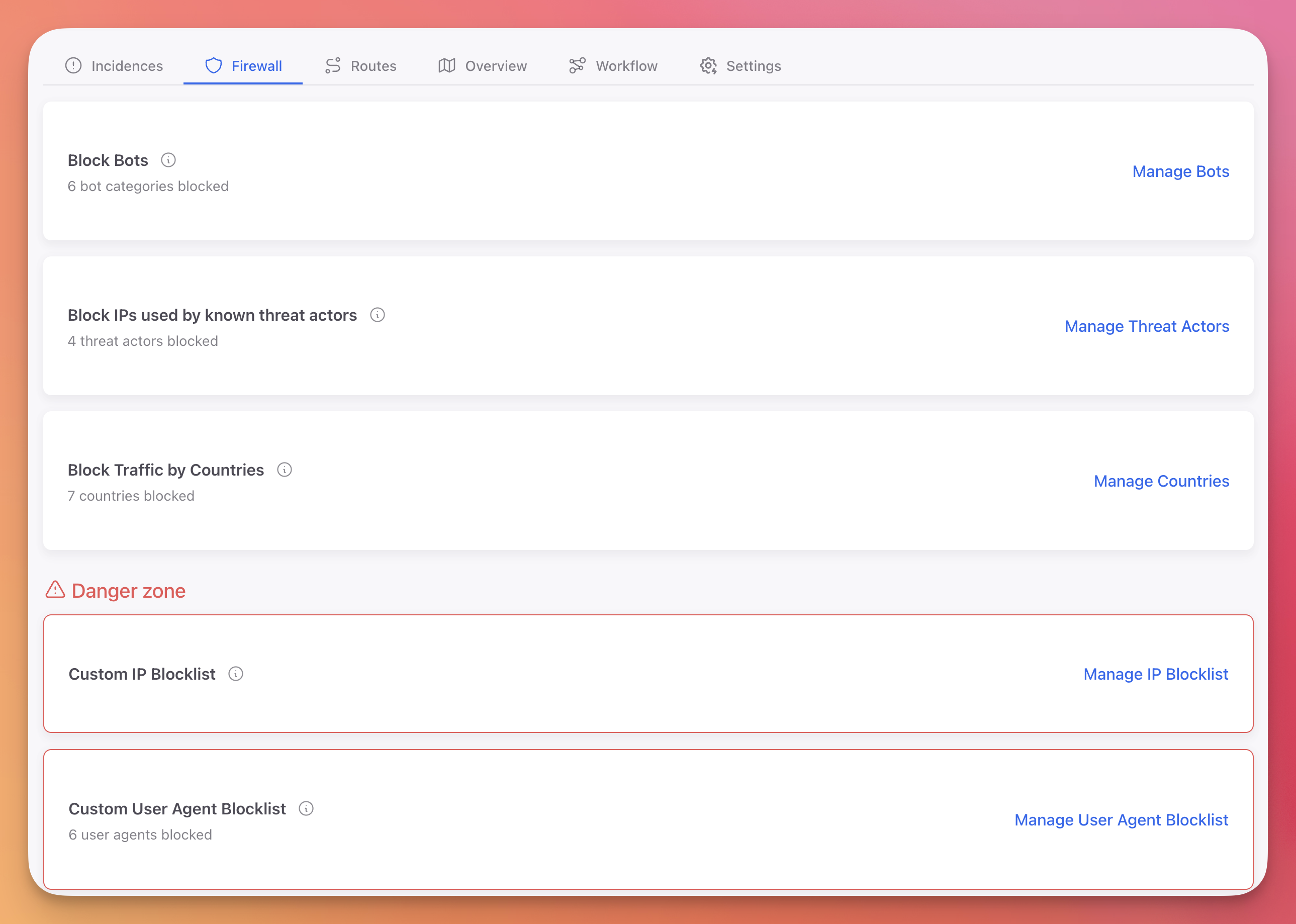
Application-level firewall capabilities. Bot detection, threat actor IP blocking (from curated intelligence feeds), geographic restrictions, and custom blocklists. These are capabilities that WAFs provide, but implemented with application context: the firewall knows the user's session state, authentication level, and request history.
Configurable automated response. Not just block/allow, but configurable actions per threat type: log the incident, block the request, block the session, block the IP, or trigger a custom webhook. The response should be updatable without redeploying the application.
Centralized visibility. A dashboard where the security team can see all incidents across all applications, filter by severity, type, and time range, and drill down into individual incidents with full context.
ByteHide Monitor for Cloud Applications
ByteHide Monitor for .NET implements this in-app protection model. It runs inside the ASP.NET pipeline and traces data flow through the application's execution.
The injection detection covers every major attack category by tracing data from input to dangerous operation:
| Attack Type | How it detects | Documentation |
|---|---|---|
| SQL Injection | Traces user input to SQL query construction, detects concatenation with unsanitized values | SQL Injection |
| NoSQL Injection | Traces input to MongoDB/CosmosDB query builders | NoSQL Injection |
| Cross-Site Scripting | Traces input to unescaped output rendering in templates | XSS |
| Command Injection | Traces input to Process.Start and shell execution calls | Command Injection |
| Path Traversal | Traces input to file system operations, validates path boundaries | Path Traversal |
| LDAP Injection | Traces input to directory service queries | LDAP Injection |
| SSRF | Traces input to outbound HTTP requests | SSRF |
| XXE | Detects external entity expansion in XML parsing | XXE |
| LLM Prompt Injection | Traces input to language model API calls | Prompt Injection |
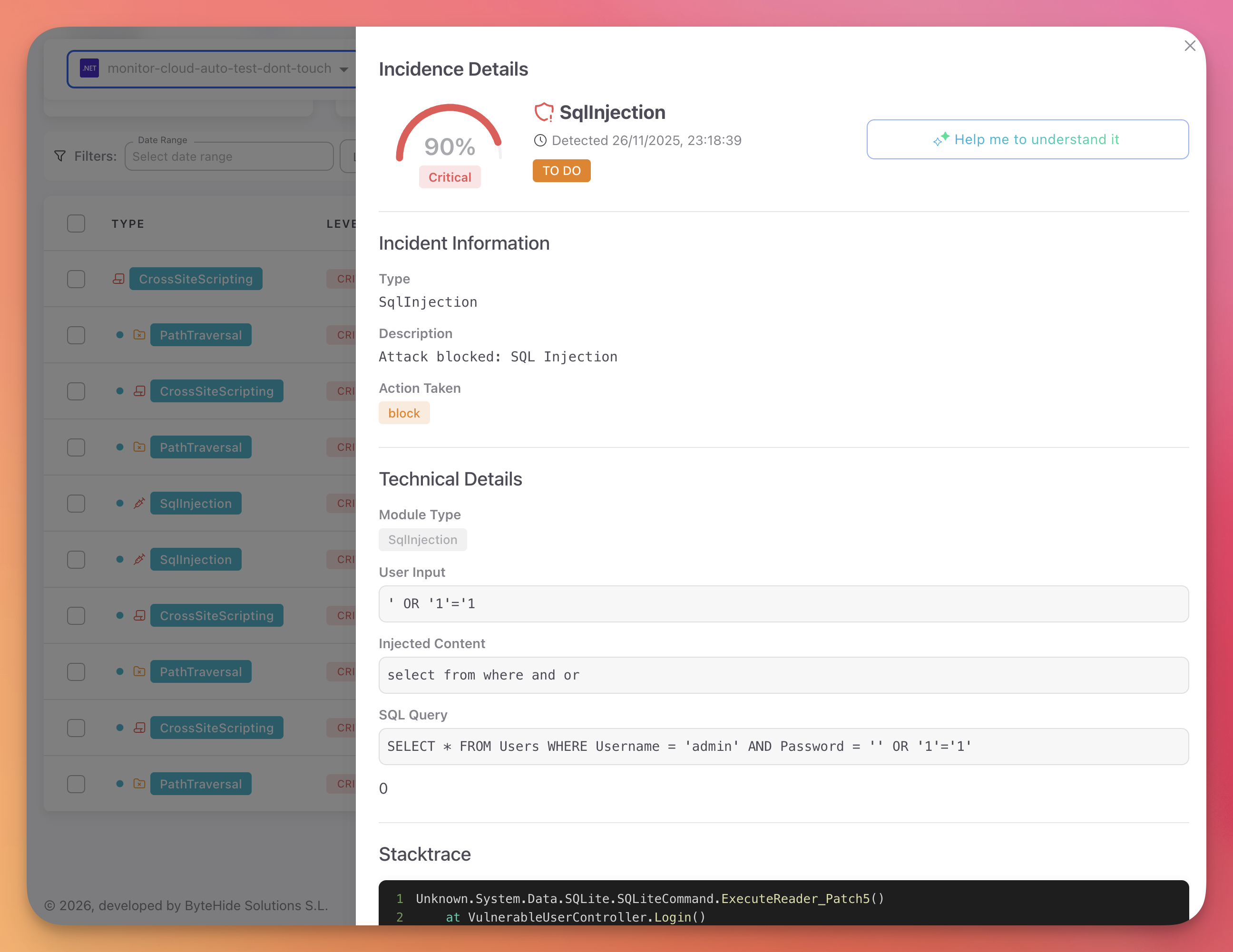
When an attack is detected, the incident includes the full execution context. This is what a real detection looks like in the dashboard:
 Click to expand
The developer receiving this incident does not need to reproduce the attack. They see the vulnerable function, the exact payload, and the query that was constructed. The fix is clear.
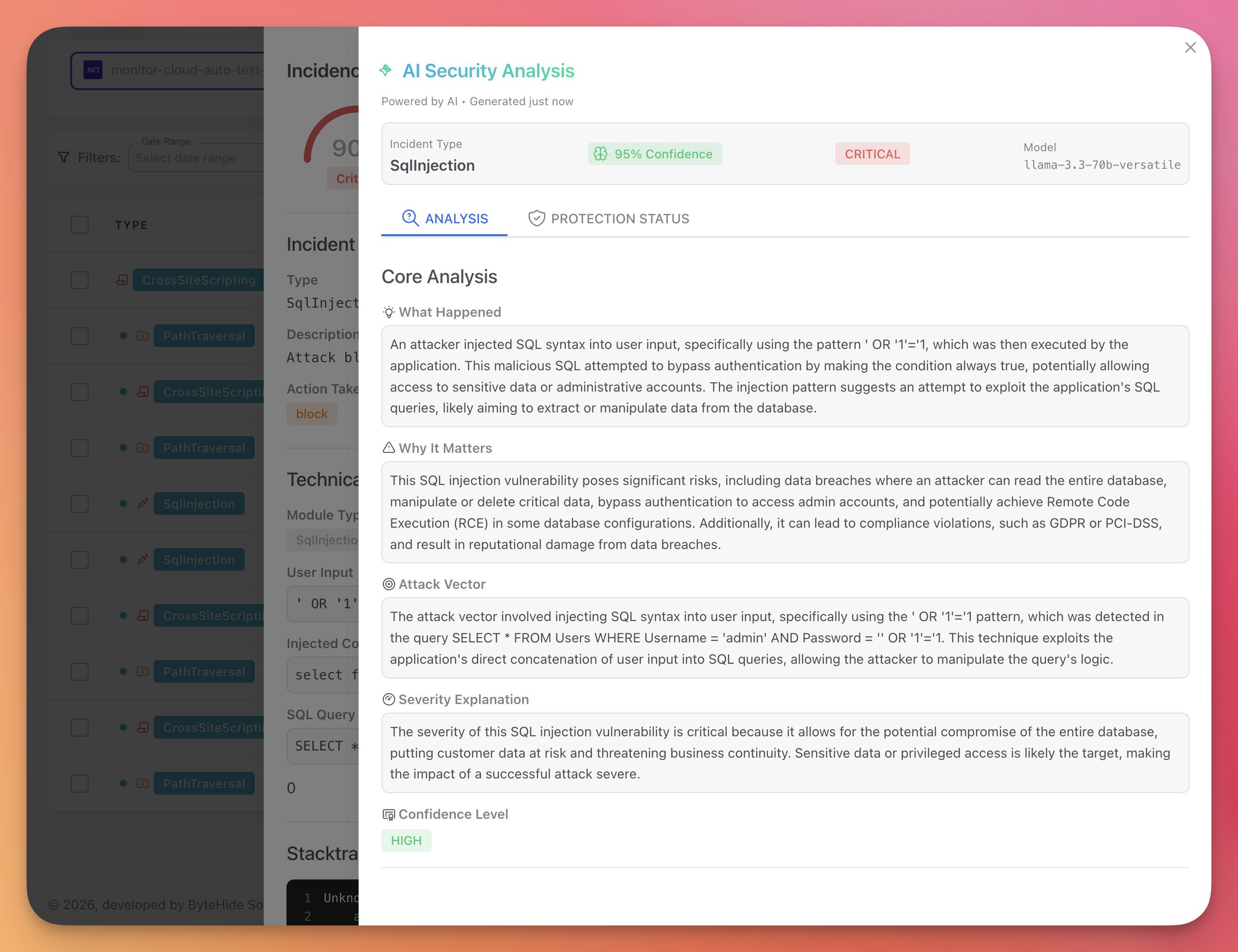
Each incident also includes AI-powered analysis that explains the attack pattern, the business impact, and the confidence level in plain language:
 Click to expand
The application-level firewall provides the same capabilities a WAF handles at the perimeter, but with full application context:
 Click to expand
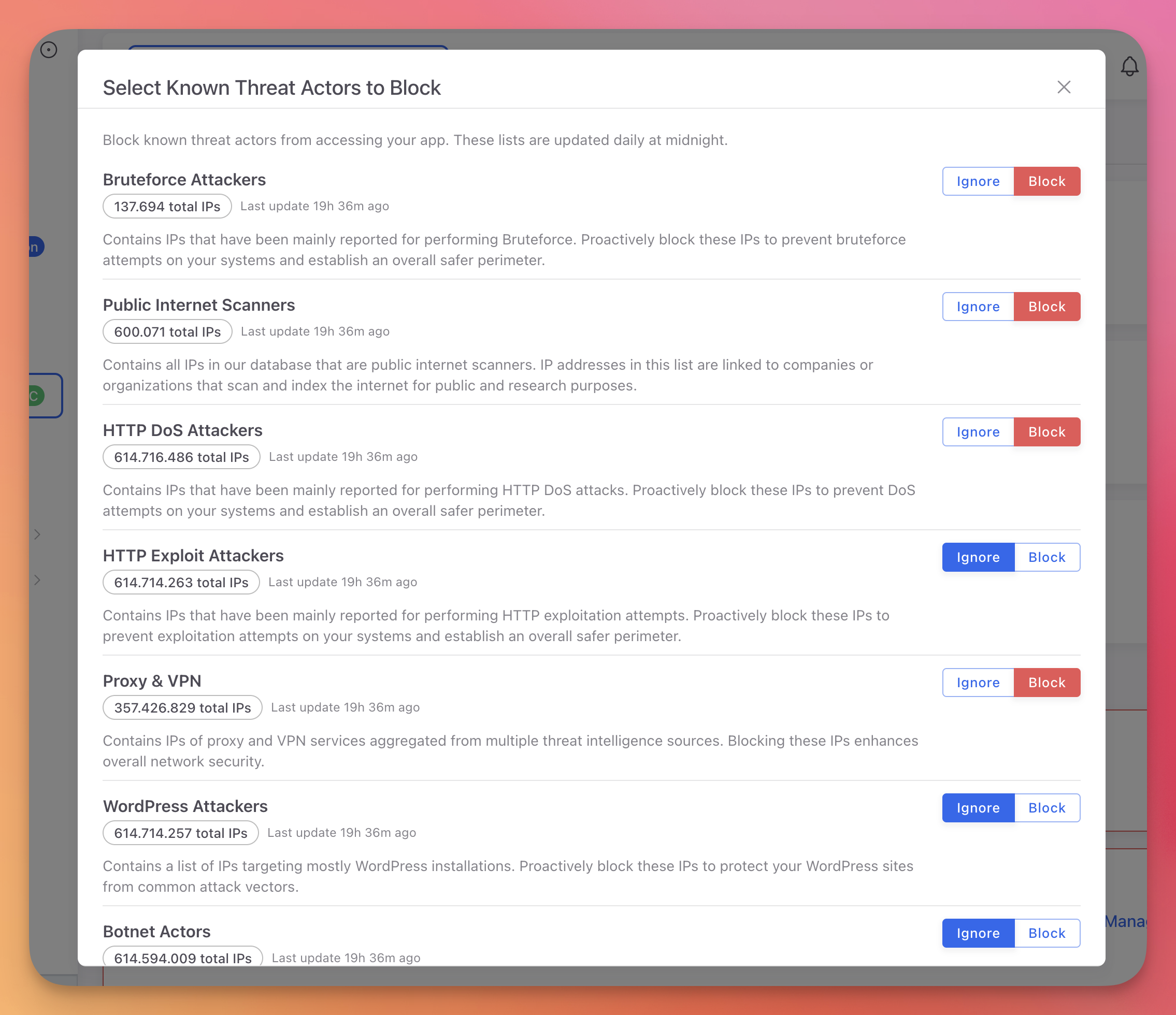
Threat intelligence feeds provide curated IP blocklists from known attack sources, updated continuously:
 Click to expand
Response rules follow an IF/THEN model: if a specific threat is detected, execute a specific action. These rules are configurable per threat type and updatable from the Cloud Panel without redeploying:
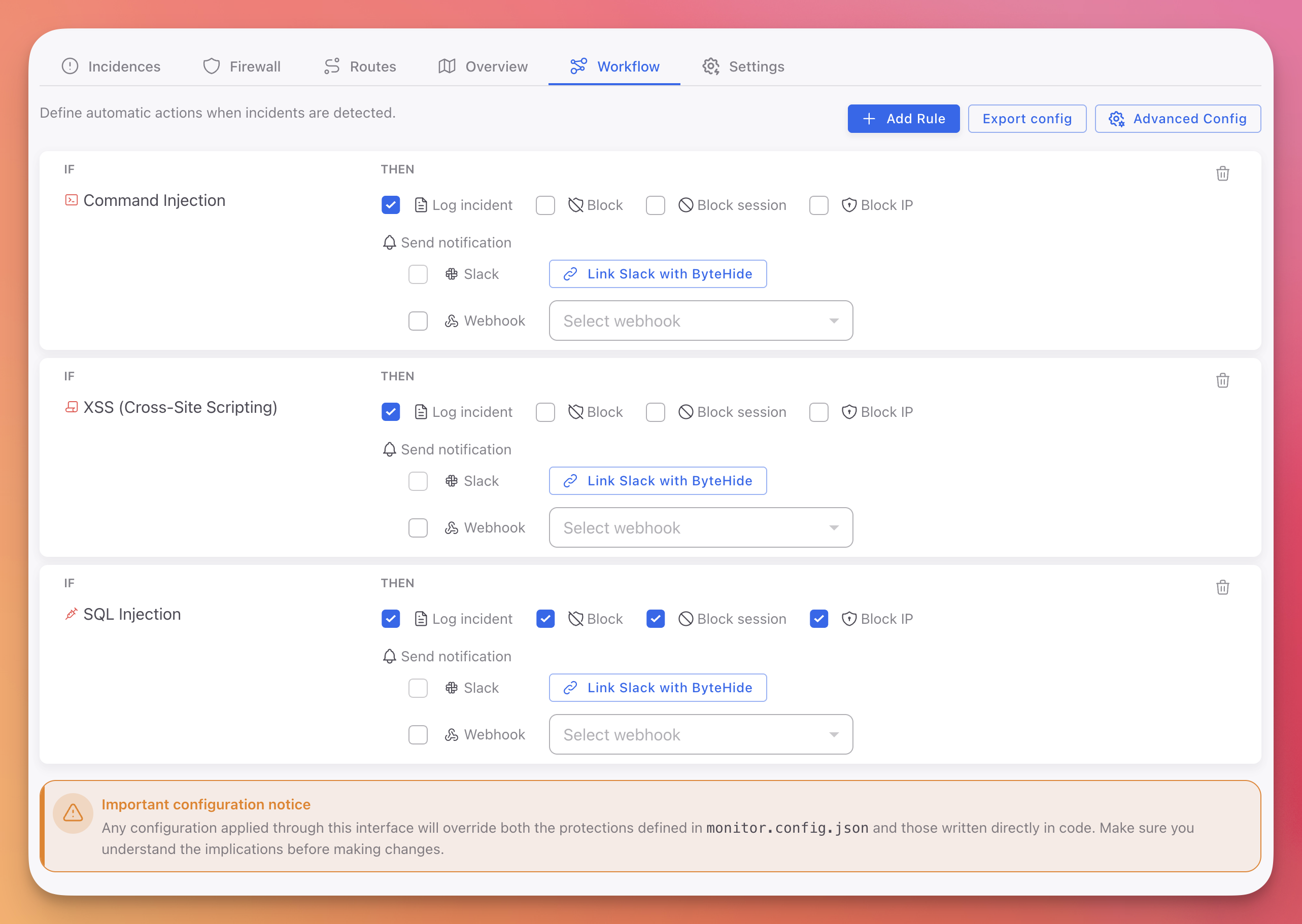 Click to expand
Part 2: Mobile Runtime Security
A Completely Different Problem
Mobile runtime security has nothing to do with network traffic or HTTP payloads. The problem is that the attacker has your binary, physically, on a device they control.
When you publish a mobile application, you ship the binary. On Android, the APK contains Dalvik bytecode that can be decompiled in minutes with tools like jadx. On iOS, a decrypted IPA exposes Objective-C or Swift symbols, class names, method signatures, and string constants. Even Flutter apps, which compile to native code on Android (.so), expose the iOS binary and the Dart snapshot.
The attacker does not need to find a network vulnerability. They just need to understand your binary well enough to manipulate it.
How Mobile Attacks Work
A typical mobile attack follows a predictable chain:
Step 1: Decompilation. The attacker uses jadx (Android) or Hopper/IDA (iOS) to read the code structure and understand the application.
Step 2: Analysis. They identify valuable targets: authentication logic, API key storage, license validation, encryption routines, payment flows, anti-fraud controls.
Step 3: Hooking or debugging. This is the critical step. Using Frida, Xposed (Android), or Substrate (iOS), the attacker intercepts function calls at runtime. They can read arguments, modify return values, and replace entire method implementations while the application runs. Alternatively, they attach LLDB or GDB to step through the code and inspect memory.
Step 4: Exploitation. With runtime control, the attacker bypasses client-side security checks, extracts decrypted secrets from memory, manipulates business logic (in-app purchases, score submission, license validation), or intercepts and modifies network traffic before it leaves the device.
Step 5: Redistribution. The attacker patches the binary (removes ads, unlocks premium, injects malicious code) and redistributes it with a new signature.
What Most "Mobile RASP" Solutions Actually Do
Many mobile security solutions marketed as RASP are not continuous protection agents. They are SDKs that inject a small set of static checks at build time:
isRooted()/isJailbroken(): Checks a list of known file paths (/system/xbin/su,/Applications/Cydia.app) and package namesisDebuggerAttached(): Callsptraceor reads a debug flag from/proc/self/statusisEmulator(): Checks hardware properties against known emulator fingerprints
These checks run once at startup (or periodically on a timer) and return a boolean. The application then decides what to do: show a warning, block access, or ignore.
The problem is fundamental. If the attacker controls the device (root/jailbreak), they control the runtime. They can hook the check function itself and force it to return false. A single Frida script bypasses the entire protection:
// Frida script - bypasses a basic root detection check
Interceptor.attach(Module.findExportByName(null, "isRooted"), {
  onLeave: function(retval) {
    retval.replace(0); // Force return false
  }
});
// Frida script - bypasses a basic root detection check
Interceptor.attach(Module.findExportByName(null, "isRooted"), {
onLeave: function(retval) {
retval.replace(0); // Force return false
}
});This is not a sophisticated attack. It takes minutes. And it defeats any protection that relies on a single function call returning a boolean.
What Effective Mobile Runtime Protection Needs
The solution to the single-point-of-failure problem is multi-signal continuous monitoring. Instead of one check that returns one boolean, an effective mobile RASP needs to:
Monitor continuously, not check once. The agent runs as a background process within the application, sampling multiple signals throughout the application's lifetime. A check at startup that passes does not mean the environment is clean five minutes later when the attacker attaches Frida.
Use multiple independent signals for each threat. Hooking detection should not rely on one method. It should monitor process memory for unexpected library loads, validate function pointer integrity, inspect loaded dynamic libraries, and detect anomalous system call patterns. Bypassing one signal should trigger anomaly detection in another.
Operate at the process level, not the API level. A boolean API call can be hooked. A kernel-level process integrity check is significantly harder to bypass because it operates below the application's function call layer.
Report full context, not just pass/fail. When a threat is detected, the system should report what was detected, when, on which device, which signals triggered, and what action was taken. This data is essential for the security team to understand the threat landscape and for the development team to improve protections.
Take automated action based on configurable rules. Different threats warrant different responses. A rooted device might be acceptable for a media app but unacceptable for a banking app. The response should be configurable per threat type without requiring a new release.
ByteHide Monitor on Mobile
ByteHide Monitor for Android and iOS implements this agent-based model. It runs as an embedded, continuous monitoring agent inside the application process.
The agent covers every category of mobile runtime threat with multiple detection signals per category:
| Category | What it detects | Android | iOS |
|---|---|---|---|
| Hooking | Frida, Xposed, Substrate, library injection, function interception | Process Injection | Library Injection |
| Debugging | LLDB, GDB, ADB, ptrace-based debuggers, remote debugging | Debugger Detection | Debugger Detection |
| Tampering | APK/IPA modification, signature verification, code patching | Tampering Detection | Tampering Detection |
| Environment | Root/jailbreak, emulators, VMs, developer mode | Jailbreak, Emulator, VM | Jailbreak, Simulator |
| Network | MITM proxies, cert pinning bypass, traffic interception | Network Tampering | Network Tampering |
| Memory | Memory dump attempts, runtime data extraction | Memory Dump | Memory Dump |
| Screen | Screen recording, screenshot capture, overlay attacks | - | Screen Recording, Screenshot, Overlay |
Every detection generates an incident with full device context, visible in the Cloud Panel:
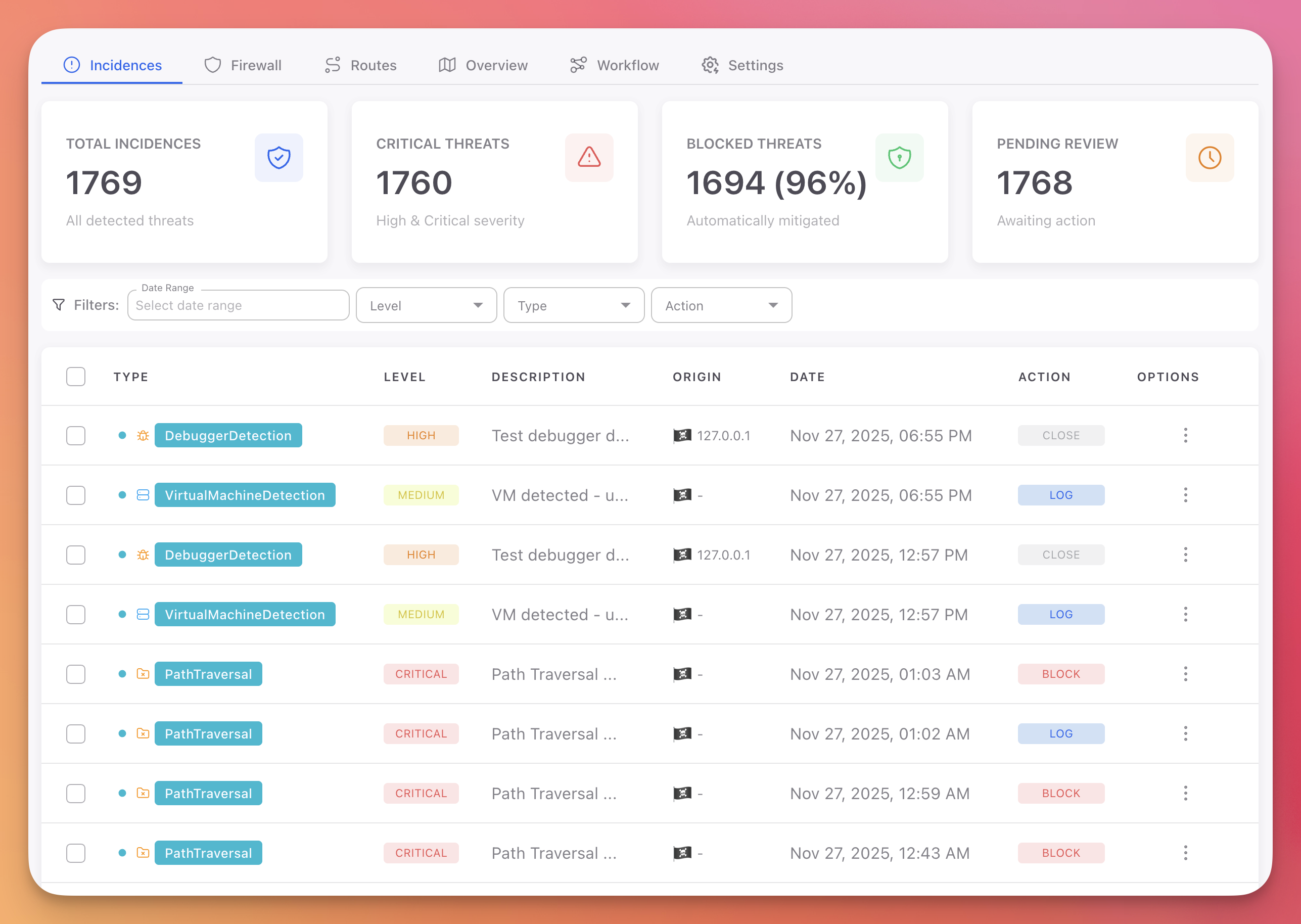 Click to expand
For mobile applications, the dashboard provides per-device visibility: OS version, jailbreak status, detected threats, session history, and block status:
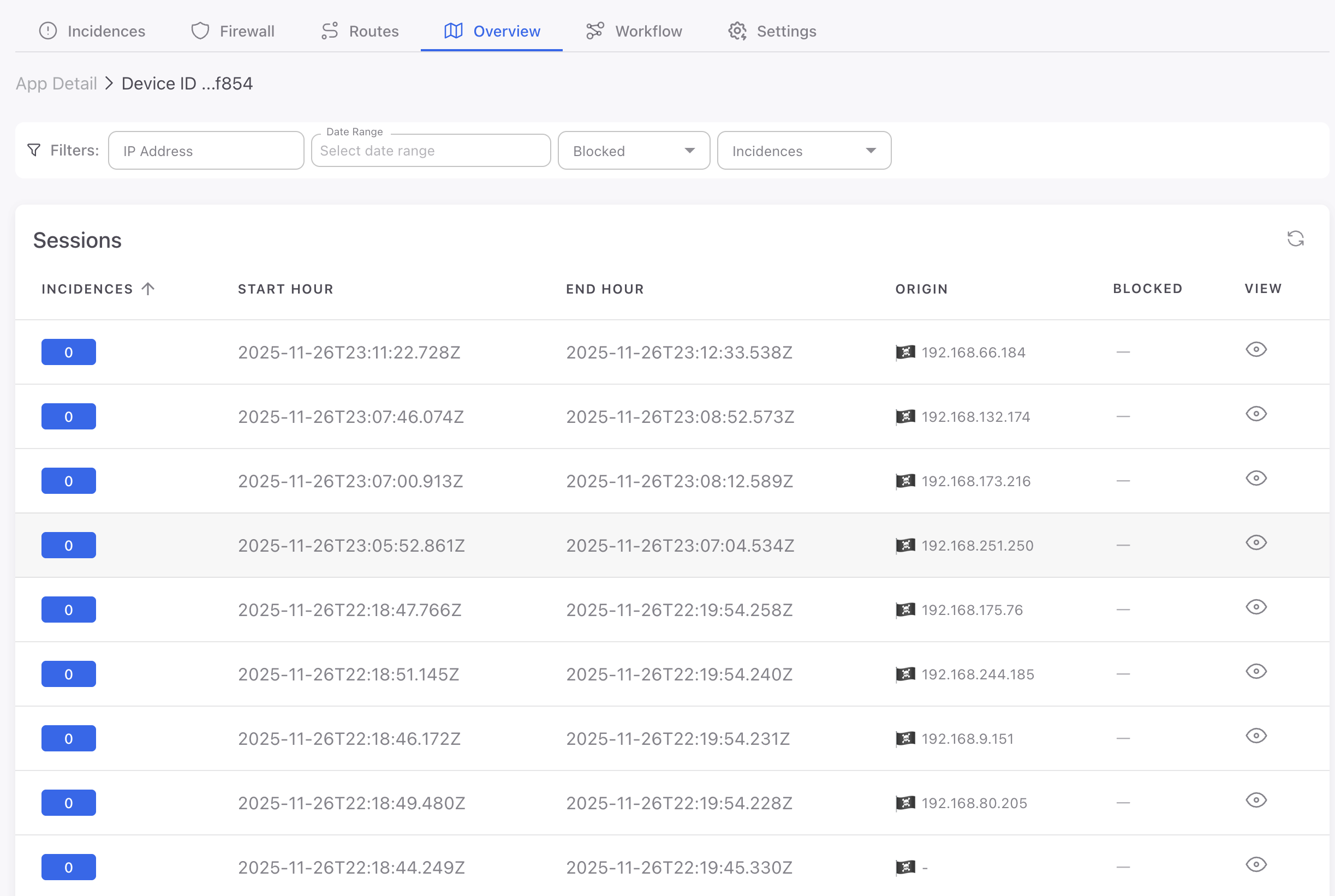 Click to expand
Combining Shield and Monitor on Mobile
For mobile applications, the strongest defense combines build-time protection (Shield) with runtime detection (Monitor).
Shield makes the binary harder to analyze by obfuscating code, encrypting strings, flattening control flow, and adding integrity checks. This raises the cost of steps 1 and 2 of the attack chain (decompilation and analysis). The attacker has to spend significantly more time understanding the binary before they can attack it.
Monitor detects and blocks the attacker in steps 3, 4, and 5 (hooking, exploitation, and redistribution). Even if the attacker gets past the obfuscation, Monitor detects the runtime manipulation through multiple independent signals.
Neither layer is sufficient on its own. Obfuscation without runtime detection can be bypassed with enough effort. Runtime detection without obfuscation gives the attacker a clear view of what the detection is looking for. Together, they create defense-in-depth that significantly raises the cost of a successful attack.
See Protecting a Mobile App Before Publishing for a complete implementation checklist.
Response Strategy: From Detection to Action
Whether the attack is against a cloud API or a mobile binary, detection without response is just logging. The critical question after detecting a threat is: what happens next?
Severity-Based Response
Not every detection warrants the same response. The right strategy depends on the threat type, the application's risk profile, and the tolerance for false positives.
Critical (block immediately): Confirmed SQL injection, hooking framework detected, binary tampered, command injection. These are unambiguous attack indicators.
High (block session): Debugger attached, process injection, SSRF attempt, path traversal reaching the file system. Strong indicators that warrant session termination.
Medium (log and alert): Rooted/jailbroken device, emulator detected, XSS attempt blocked before rendering. These could be legitimate users or early reconnaissance. Block only for high-security applications.
Low (log only): VPN detected, developer mode enabled, anomalous but non-malicious patterns. Weak signals that gain value when correlated over time.
All response rules are configured from the Cloud Panel without redeploying the application.
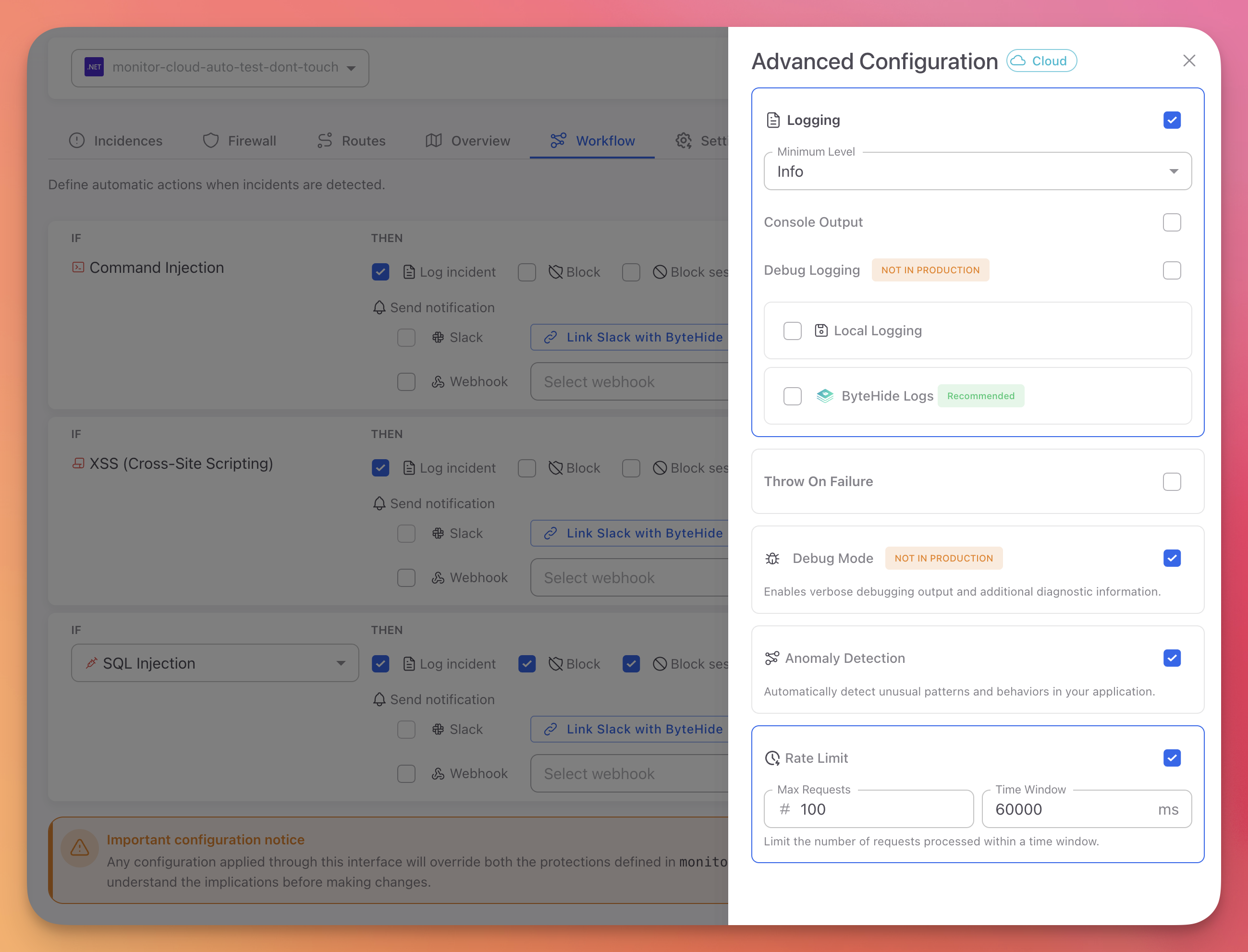 Click to expand
Centralized Visibility Across All Platforms
All detections from all platforms (mobile and server) feed into a single dashboard. This is where the security team operates day-to-day.
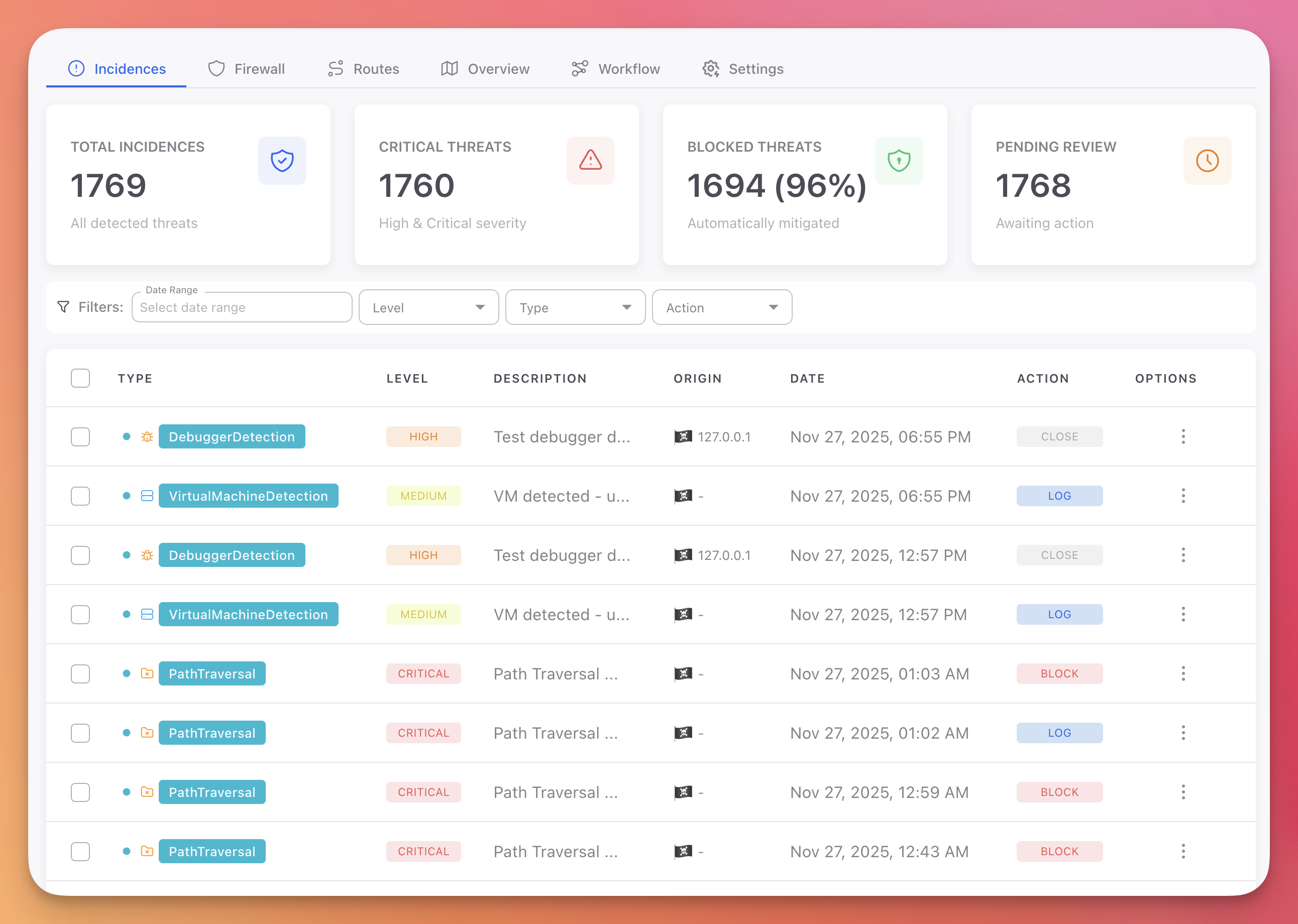 Click to expand
The overview shows total incidents, critical threats, blocked percentage, and pending review count across all applications:
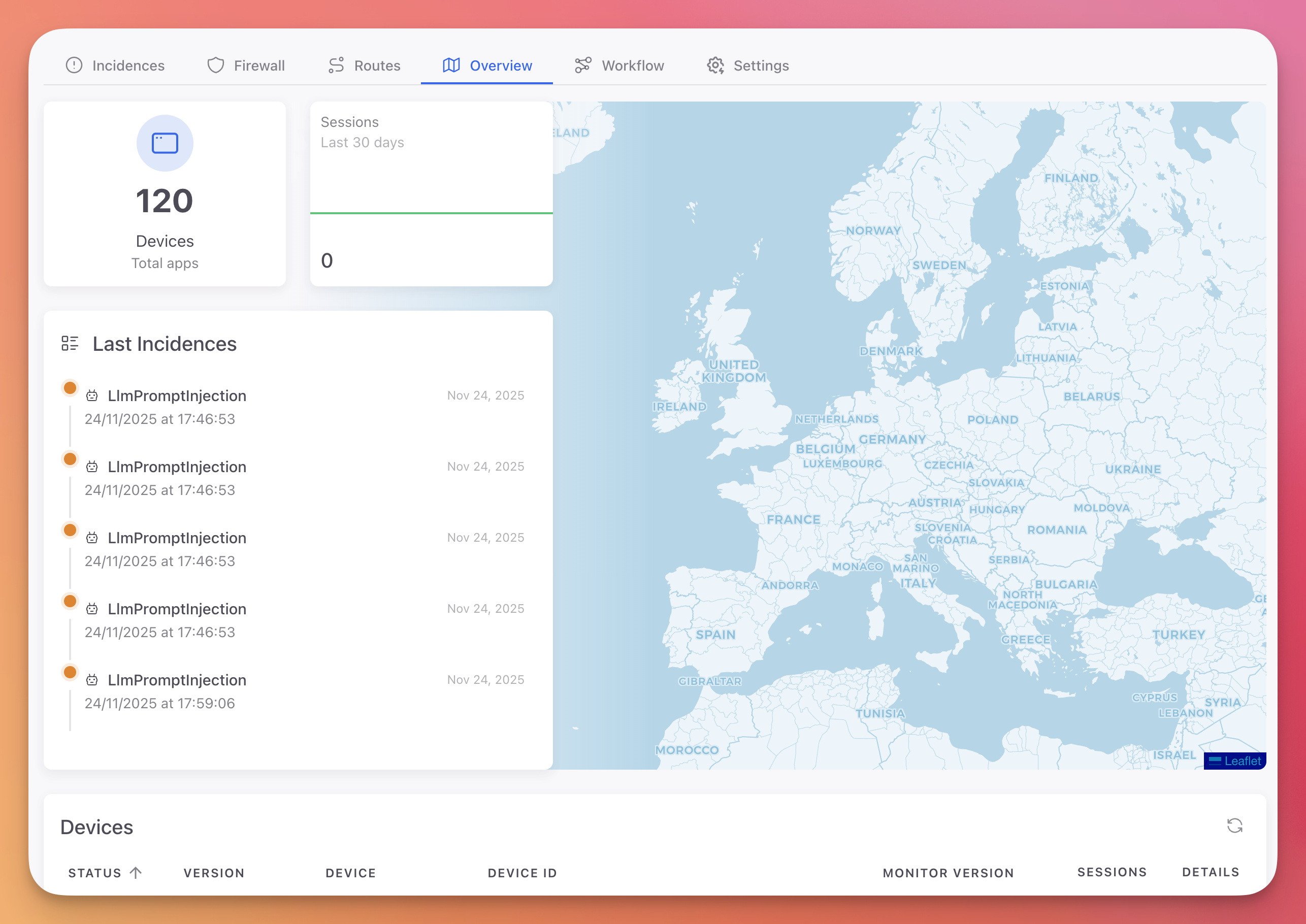 Click to expand
For cloud applications, the Routes view shows which API endpoints are being targeted, the attack types detected per route, and the volume of malicious traffic:
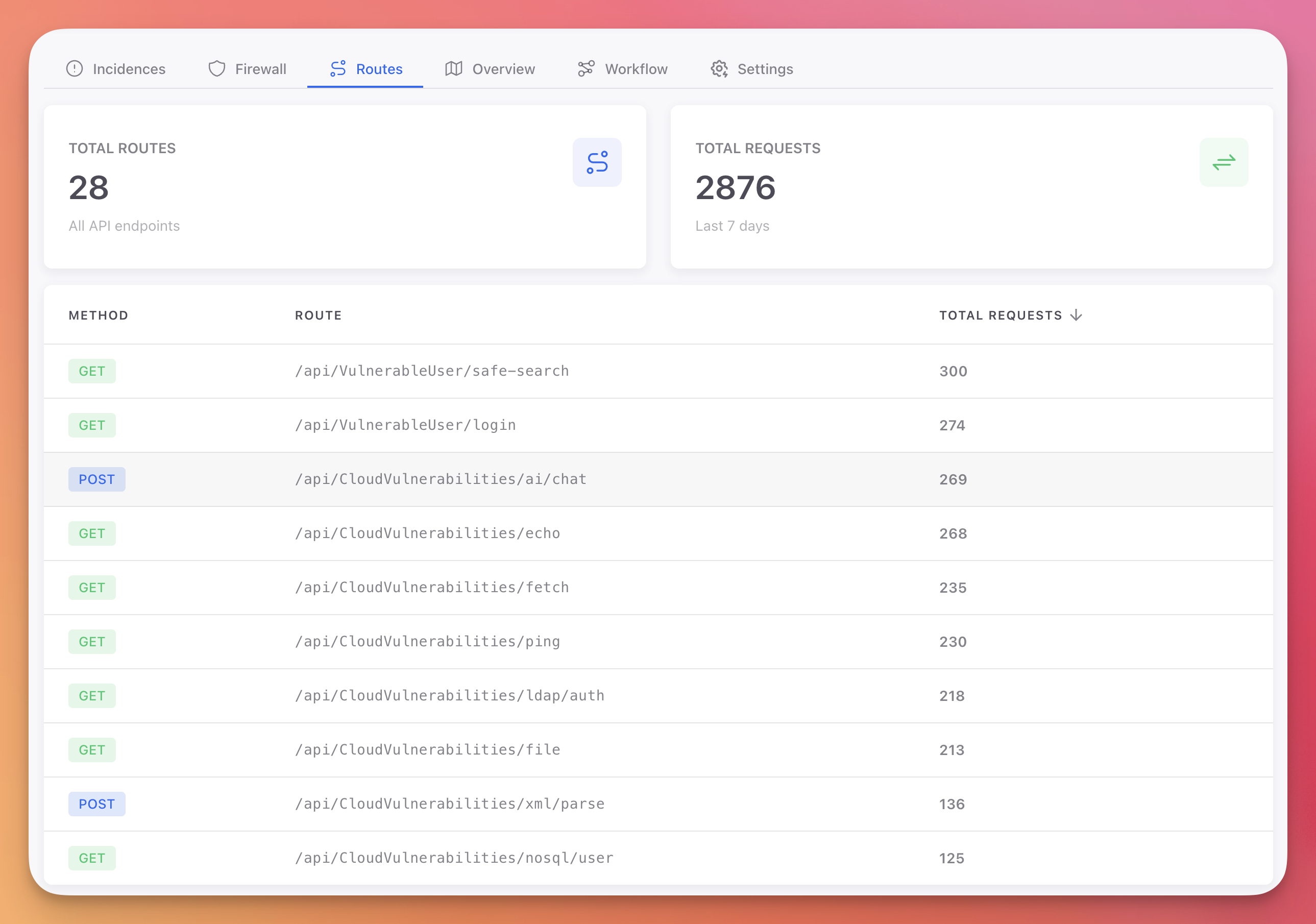 Click to expand
Session details provide a full timeline of a user's interaction, including every security event:
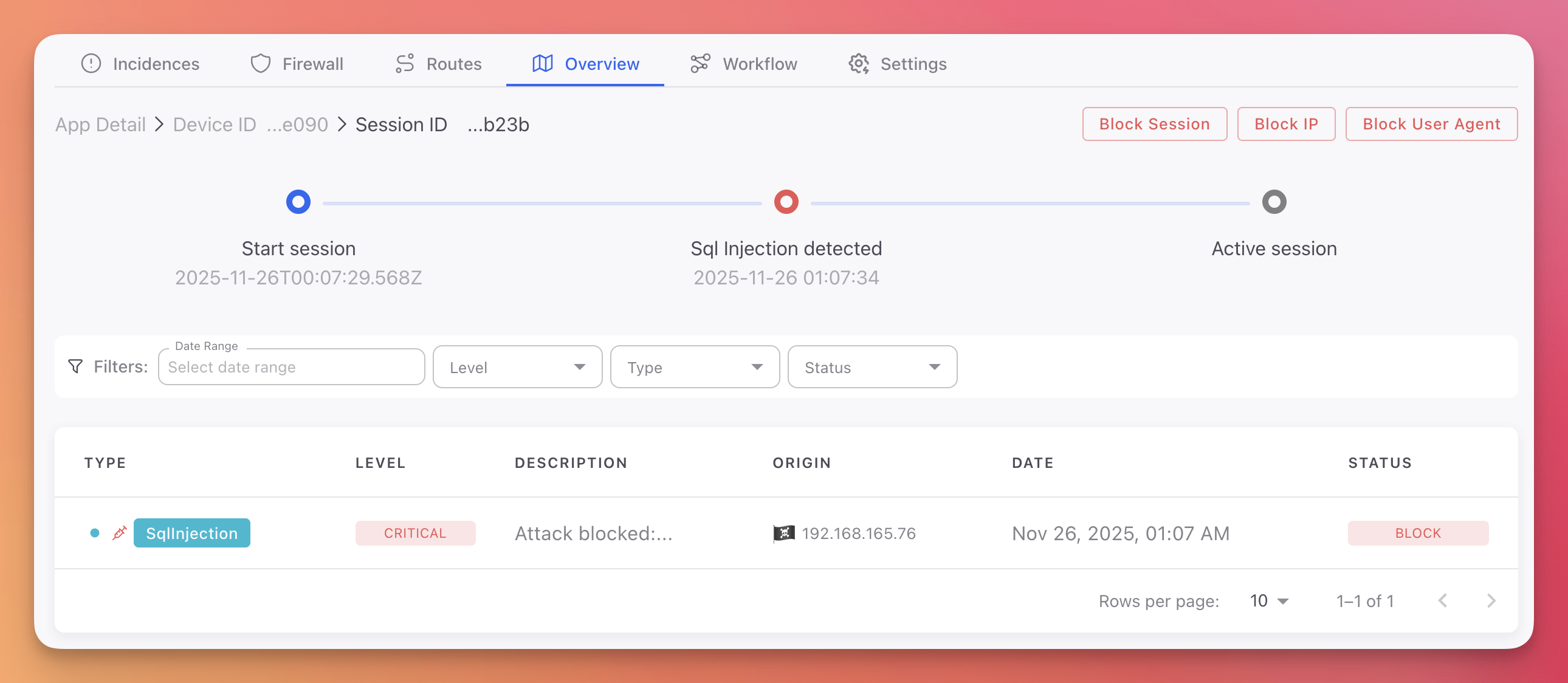 Click to expand
Closing the Loop: From Runtime Back to Development
Runtime protection blocks attacks. But blocking without fixing leaves the vulnerability in place permanently. The real value of an instrumented RASP is the intelligence it produces for the development team.
When Monitor detects a SQL injection against /api/users, it captures the payload, the stack trace, the vulnerable function, and the attack frequency. When Radar (static analysis) has already identified the same vulnerability in the source code, Runtime Correlation connects the two automatically.
| Finding | CVSS | Runtime Signal | Adjusted Priority |
|---|---|---|---|
SQL Injection in /api/users | 8.6 | 47 exploit attempts this week | Critical - Runtime Confirmed |
XSS in /admin/reports | 6.1 | No attempts observed, internal endpoint | Low (deprioritized) |
Path Traversal in /api/files | 7.5 | Endpoint is internal only, zero traffic | Low (deprioritized) |
SSRF in /internal/webhook | 9.1 | Unreachable from external | Medium (down from Critical) |
The vulnerability being actively exploited gets escalated. The vulnerabilities nobody is attacking get deprioritized. The development team fixes what matters based on evidence, not theoretical severity scores.
This is what transforms a RASP from a permanent runtime cost into an intelligence engine that drives vulnerability elimination at the source.
See Why Disconnected Security Tools Fail for the complete analysis of why this feedback loop matters and how most security tool stacks fail to achieve it.
Next Steps
- .NET Monitor Documentation - Server-side in-app protection setup and configuration
- Android Monitor Documentation - Mobile RASP for Android (Kotlin/Java/Flutter)
- iOS Monitor Documentation - Mobile RASP for iOS (Swift/Objective-C/Flutter)
- Cloud Panel & Workflow Configuration - Configure automated responses
- Runtime Correlation - Connect runtime detections with development findings
- Why Disconnected Security Tools Fail - How tool fragmentation creates blind spots and how correlation solves it
- Protecting a Mobile App Before Publishing - Complete Shield + Monitor checklist for mobile
- Setting Up a Security Pipeline - How Monitor fits into the full development-to-production lifecycle